
Once Copy2Contact has been installed on your BlackBerry, using it is just 3 easy steps:
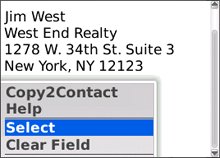
Choose the Select option from the menu and then roll the trackball to highlight the complete contact information that you want.
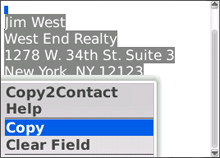
Choose the Copy option from the menu to copy the highlighted text to the clipboard. Don't forget this step!
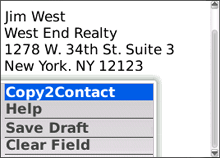
Choose the Copy2Contact option from the menu to activate Copy2Contact.