
Copy2Contact Tips
- Don't forget to copy the text you have highlighted before activating Copy2Contact.
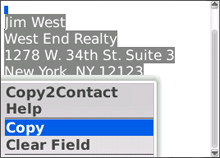
- Be sure to select and copy only the text that belongs in the new contact and nothing before or after it:
Jim West
West End Realty
917.545.5414 (office)
917.230.1244 (cell)
west@were.com
Winner, most properties sold!
- To create an appointment on your calendar, select and copy only the text that describes the day, time, and description of the event:
Hello all-
Can we meet tomorrow at 10:30 for a half hour to discuss the new client?
See everyone there!
- Jim
- You can capture contacts and appointments from any source, including:
- Email messages
- SMS messages
- Web search results
- To capture a contact or appointment from inside DocumentsToGo or another 3rd-party application:
- Select and copy the text
- Press END to return to your home screen
- Press the MENU key
- Choose "Copy2Contact"
See also our Frequently Asked Questions.
© 2009-2012 Anagram Technologies
Home - Getting Started - Examples - Support